
The container image is identical. It passed the same tests, came from the same registry, and runs the same way on a developer’s laptop. Then it gets deployed to a gateway next to a packaging line, and almost everything around it changes.
As IT and OT converge, more IT and platform teams are being handed responsibility for plant sites, often with the expectation from leadership that what works in the data center can be copied and pasted straight across. Their skills transfer, but many of their assumptions don’t. Here are ten that are valid in the data center but fail on the plant floor.
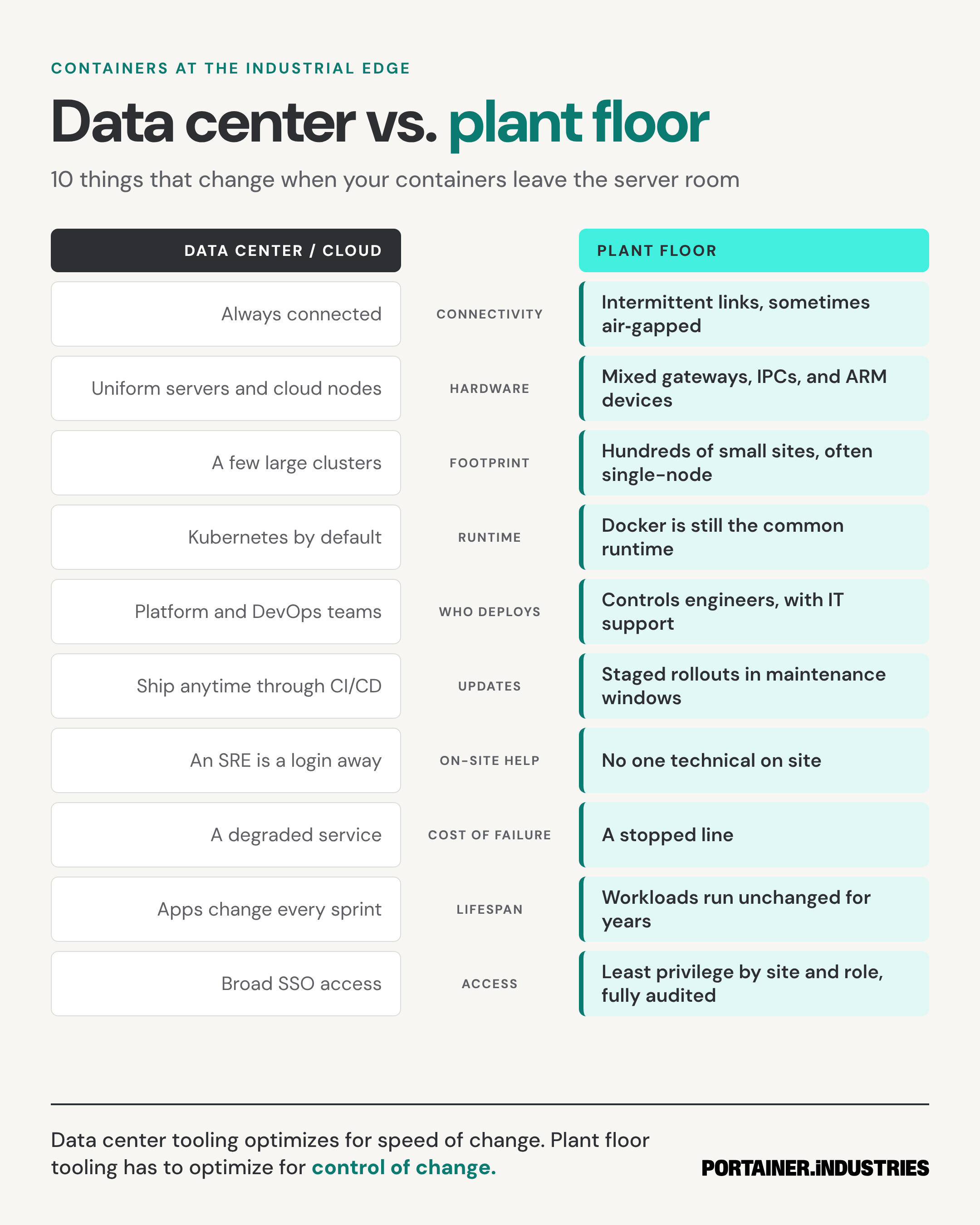
1. Connectivity: assume the link will drop
Data center tools expect a constant connection to a control plane, a registry, and a monitoring stack. Plant networks are segmented by design and are sometimes air-gapped. Remote sites often run over cellular or satellite links that can drop without warning. A deployment model that fails when the connection fails will fail often. The key thing to understand is that offline doesn't necessarily mean unmanaged. It just means that management has to tolerate gaps.
Plan for sites that keep running when the link is down and catch up when it comes back. Portainer’s Async Edge Agent works this way. Changes are queued centrally and applied the next time a site checks in, and if the management server is unreachable, the site’s workloads keep running.
2. Hardware: plan for a mixed fleet
Data center hardware is bought in batches and standardized. Plant floor hardware, on the other hand, has been accumulated over decades with industrial PCs from one vendor, gateways from another, and an ARM device mounted onto a machine by a system integrator many years ago. You build images for multiple CPU architectures and test on the actual devices in the field rather than the one that's the closest match in the lab.
3. Footprint: hundreds of small sites
A data center team might run a handful of large clusters. An industrial estate is often the opposite: hundreds of sites, many running a single node. Logging into each one eventually stops working somewhere around the first dozen.
Treat the sites as a fleet. Group them by plant, region, or line. Define the desired state once and apply it to groups instead of individual hosts. Small sites, multiplied, are a large estate.
4. Runtime: meet the site where it is
Kubernetes is the default in many data centers. On the plant floor though, many applications aren’t containerized. They still run on Windows PCs, in virtual machines, or inside vendor appliances. Where containers do run, Docker and Docker Compose are still the common runtime, often because the vendor that supplied the application shipped it that way. Kubernetes has a place at the edge, including single-node distributions built for constrained hardware, but forcing a migration just to match the data center adds risk without adding value.
5. Who deploys: design for the person on site
In the data center, a platform team owns the end to end deployment. On the plant floor, the person deploying an update could be a controls engineer who knows the line well and maybe Linux not at all. That changes what good tooling looks like: a set of approved applications they can deploy without writing configuration files, access limited to their own site, and IT available as support rather than as a gatekeeper. The goal is to make the safe action the easy one.
6. Updates: wait for the window
Continuous delivery assumes you can ship changes as soon as they pass the pipeline. On a production line, though, updating in the middle of a shift is a risk the plant manager won’t approve. Updates happen during planned maintenance windows, first at a pilot site, then in stages across the fleet. Every rollout needs a tested way to roll back. It’s more important to know exactly what changed, where, and when than to move fast.
7. On-site help: assume no one is there
If something breaks in a data center, an SRE logs in. At a remote site, there might not be anyone technical on site, and whoever is there has production goals to meet. Anything that needs someone at a keyboard becomes a truck roll. If you can see container status and logs remotely, and redeploy from the center, you can handle issues as support tickets instead of site visits.
8. Cost of failure: a stopped line
A failed deployment in the data center usually means a degraded service and an incident review. On the plant floor, the same failure can stop a line or scrap a batch. In some environments, it can even become a safety issue. This difference should guide every decision, from how often you make changes to who is allowed to make them. A stopped line has a cost per minute, a number everyone on site knows.
9. Lifespan: workloads run for years
Data center applications are updated every few sprints. Plant floor workloads are expected to run for years, often alongside equipment built to last decades. That doesn’t mean they never change, because security patches and OS updates still arrive. But because the person maintaining that workload in five years probably isn’t the person who deployed it, each change has to be deliberate, documented, and reversible.
10. Access: least privilege by site and role
Wide single sign-on access works when everyone is on the same team. On the plant floor, a contractor at one site shouldn’t see another site, and an operator who can restart an app shouldn’t be able to change its settings. Limit access by site and role, and keep a record of who changed what. Regulated industries will require this. Everyone else will want it as soon as something goes wrong.
Speed of change vs. control of change
Taken together, these differences add up to one main shift. Data center tooling optimizes for speed of change. Plant floor tooling has to optimize for control of change: knowing what is running at every site, changing it deliberately, and undoing it quickly when needed.
While the data center playbook still applies, it needs an extra set of rules for the sites where a failed update stops a line.
To see how that plays out across a large estate, learn more about Fleet Operations, or read why IT/OT convergence is moving faster than operational control.