
In my engineering journeys I frequently encounter resource-constrained infrastructure environments. One of our recent edge projects provided bare-metal hardware with barely 2 GB of RAM. In such constrained settings, conventional Kubernetes distributions consume the majority of available system capacity before user workloads even launch. Yet, I wanted to see if it was possible to have the identical Kubernetes experience on our edge devices as we already maintain across our central management clusters. Basically, kubectl everywhere! Adopting KubeSolo resolved this challenge directly, even within these constrained environments.
Engineering Kubernetes for Extreme Resource Constraints
KubeSolo delivers a complete, single-node Kubernetes distribution packaged within a solitary binary. Maintained under the Portainer ecosystem and hosted on the KubeSolo GitHub repository, the project eliminates clustering overhead entirely. The architecture replaces etcd with an embedded SQLite database using Kine and a lightweight NodeSetter webhook manages pod placement, which removes the need for a standard kube-scheduler. Pretty nifty!
The API server, controller manager, kubelet, and containerd runtime execute together within a single process. Consequently, the entire baseline control plane operates inside an idle memory footprint well under 200 MB of RAM, typically hovering around 180 MB. Standard manifests, Helm charts, and Custom Resource Definitions function without modification, allowing teams to preserve their established deployment practices. It also made my edge setup OS agnostic, making my design way more portable as it could run on any system that could run KubeSolo. Exactly what I was looking for.
I have been in direct contact with the developers and friendly Portainer staff early on and many improvements were made to make KubeSolo even more flexible and fit for even more scenarios. Kudos to those who I have been in contact with and thank you for listening to your community and end-users. Much appreciated! And thank you for shipping me a KubeSolo t-shirt, I wear it proudly 😎.

Driving Consistency Across Edge and CI/CD
Edge deployments represent only part of the operational value. I also actively integrate KubeSolo into our continuous integration and continuous deployment pipelines. Automated test runners require rapid, disposable cluster provisioning without the overhead of heavy virtualization or multi-node coordination.
KubeSolo initializes in seconds, executes integration tests against real Kubernetes APIs, and terminates cleanly. Engineers benefit from identical deployment behaviors across development workstations, automated testing pipelines, and remote production edge gateways. All in a small form factor binary. Pretty handy if I might say so.
Native Observability in KubeSolo v1.2.0
Operational transparency remains essential when running production workloads at the edge. The release of KubeSolo v1.2.0 introduces native Prometheus metrics endpoints for both the API server and the kubelet. Operators can inspect runtime health, API request latencies, and cAdvisor container telemetry directly through standard Prometheus scrape endpoints on port 6443. This enhancement combines the ultra-lightweight runtime with a level of observability integration that the community expects these days.
Hands-On Demo: Podman, Grafana Alloy, and Pre-Built Dashboards
To help engineering teams evaluate this architecture, I assembled a complete yet simple demonstration environment. The demo packages KubeSolo inside an isolated Podman container on macOS or Linux (Have not tested this on Windows, mileage may vary 😉). The container bundles kubectl directly, eliminating the need to install host-level cluster management binaries. Users can launch the container with a single command, verify cluster readiness within twenty seconds, and immediately deploy containerized applications such as an MQTT broker. KubeSolo's own control plane keeps idling well under 200 MB of RAM (about 180 MB) inside this container; layering CoreDNS, the local-path-provisioner, Grafana Alloy, and the Mosquitto MQTT broker on top adds roughly 140 MB more, bringing the full demo to around 320 MB. You can find the full demo, including the Containerfile, Grafana Alloy manifests, and dashboards, in the kubesolo-demo directory of my blog repository on OpenCommit.
Collecting telemetry from this deployment requires minimal configuration. If you'd like to check it out, the demo deploys Grafana Alloy as a native workload inside the KubeSolo cluster itself. Authenticating through a standard in-cluster ServiceAccount, Alloy scrapes both the API server and the kubelet proxy endpoints. It then forwards the time-series data via Prometheus remote-write protocols to Grafana Cloud (what I have tested it with) or to an endpoint on your privately managed Grafana stack or Prometheus. Grafana offers a free cloud tier that you can also use. With Grafana Alloy you have many options, check out the docs and see how you can connect Grafana Alloy with your locally managed setup.
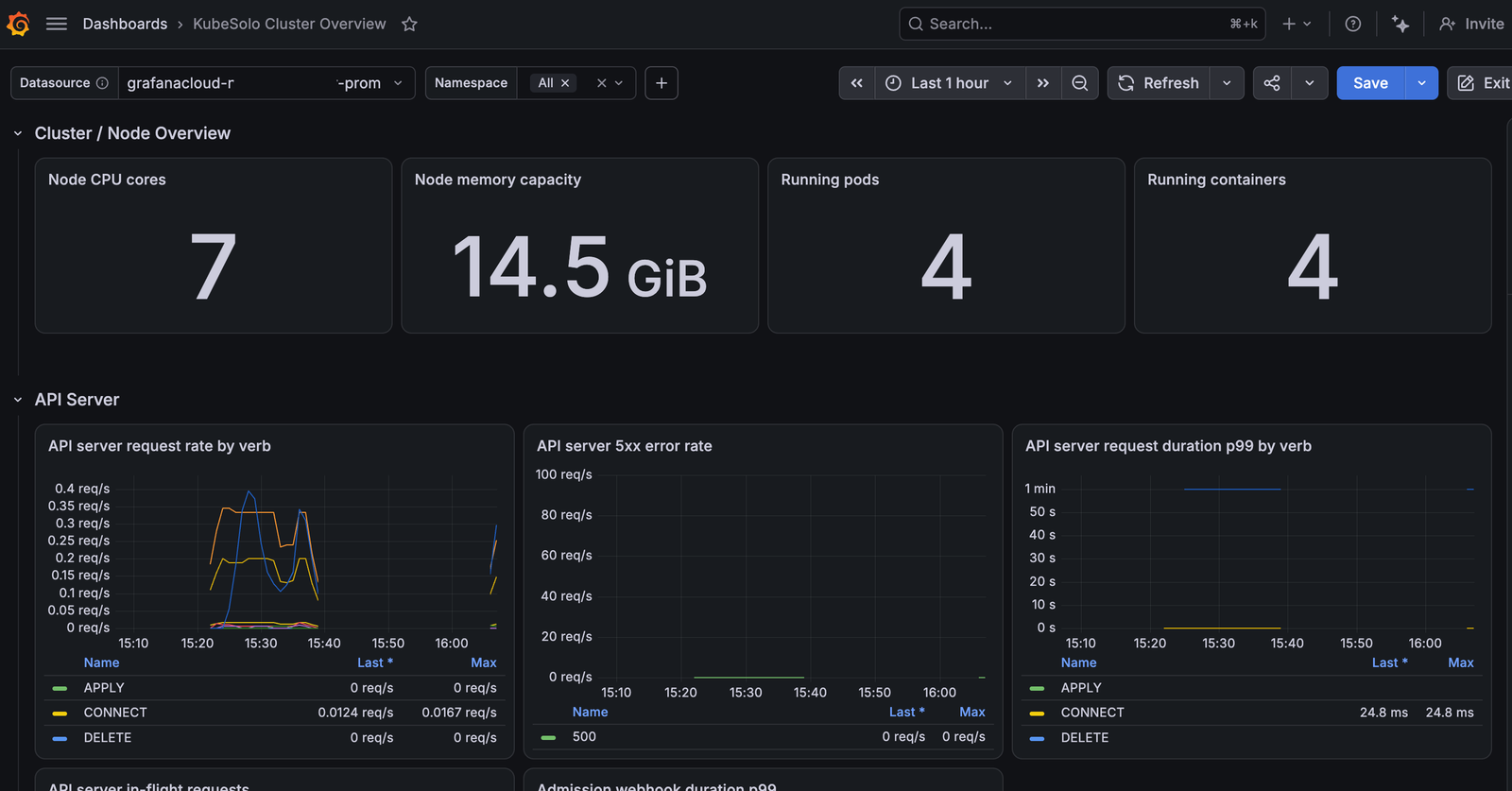
To complete the implementation, the repository provides pre-built Grafana dashboards. These dashboards import directly into Grafana Cloud or self-hosted environments. They render immediate operational visibility into API server latencies, controller workqueues, node resource consumption, and container workloads. Both the classic and the V2 API versions of the dashboards are present within the repo. V2 API gives you the nicest looking dashboard as it uses the latest and greatest Grafana dashboard options, you should be able to either sync your dashboard from within Grafana with any git repo or apply the dashboard directly via the Grafana API endpoint.
Speaking of giving back, I actually ended up donating this very Grafana dashboard to the KubeSolo project, and the Portainer team was kind enough to merge it in. So rather than copy-pasting JSON from a blog post, you can now grab the dashboard straight from the official KubeSolo examples folder on GitHub, which feels like a nicer, more sustainable home for it. Always a good feeling when open source gives back more than you put in.
Conclusion
KubeSolo demonstrates that resource-constrained edge computing does not require sacrificing standard Kubernetes control planes. By minimizing its own control-plane footprint to well under 200 MB while supporting native APIs and Prometheus metrics, it delivers practical utility for both edge devices and automated CI/CD pipelines, even once real workloads and full observability tooling are layered on top. Explore the official project documentation, linked below, and inspect the source code on the KubeSolo GitHub repository to start testing today.
If you want to know more about how I use KubeSolo for my edge project, please feel free to contact me via OpenCommit or LinkedIn.